> ## Documentation Index
> Fetch the complete documentation index at: https://akron-cdb9eaf4.mintlify.site/llms.txt
> Use this file to discover all available pages before exploring further.
# Import and export .akr packs
> Export, import, and share whole or scoped Akron .akr setup packs for backups and map-specific workflows.
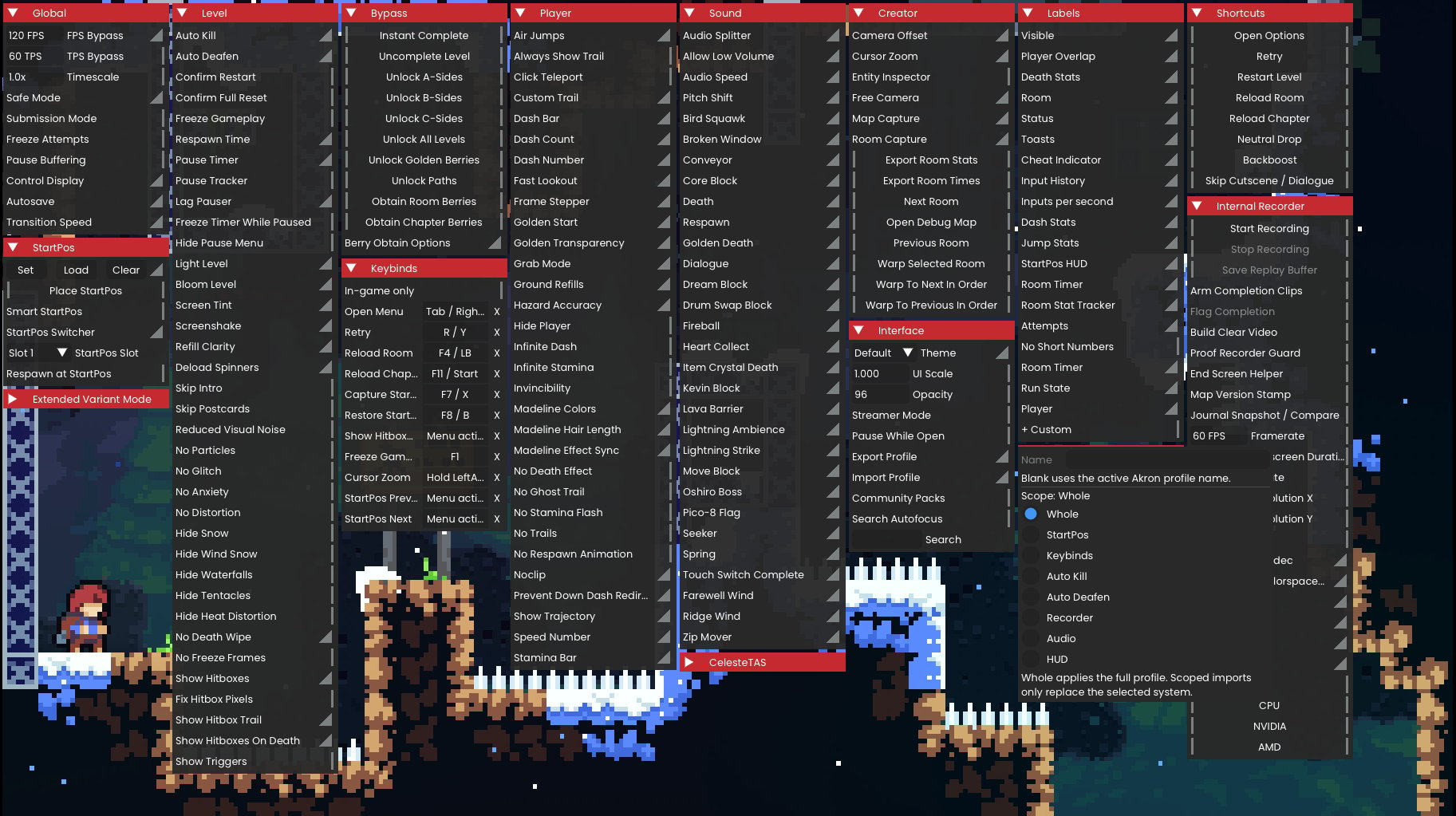
Akron uses `.akr` files to back up and share setups. Export the whole Akron setup or a single scoped section.
 ## Export a .akr pack
Open the Akron overlay, go to **Interface**, and choose **Export Setup**.
Select `Whole` for a full backup, or choose a scoped section: `StartPos`, `Keybinds`, `AutoKill`, `AutoDeafen`, `Recorder`, `Audio`, or `Hud`.
Confirm the export to write the `.akr` file to the Akron setup export directory.
Check the file name, scope, and intended map or context before sharing the pack.
## Import a .akr pack
Export your current setup before importing a shared pack.
Open the Akron overlay, go to **Interface**, and choose **Import Setup**.
Select `Whole` for a full setup import. For scoped packs, choose the target section before selecting the `.akr` file.
Choose the `.akr` file in the file browser and confirm that the scope matches the intended change.
Apply the import, then test the changed settings in a non-submission context.
## Section behavior
| Section | Import behavior |
| ------------ | ------------------------------------------------------------------------------------------------ |
| `Whole` | Replaces the full setup state, button bindings, menu action bindings, and StartPos slots. |
| `StartPos` | Merges StartPos settings and saved slots. |
| `Keybinds` | Merges Everest button bindings and Akron menu action bindings. |
| `AutoKill` | Merges Auto Kill trigger and area state. |
| `AutoDeafen` | Merges Auto Deafen trigger, hotkey, and area state. |
| `Recorder` | Merges recorder output, replay, trigger, audio, codec, and preset state. |
| `Audio` | Merges audio speed, pitch, volume, override, and device state. |
| `Hud` | Merges HUD widgets, labels, input displays, resource bars, counters, and HUD presentation state. |
Scoped imports replace only the selected section and do not reset unrelated settings.
Importing a configuration does not make cheat behavior clean. Imported cheat options can mark an attempt as Cheat when used.
See [Akron .akr archives](/reference/akr-archives) for the archive format.
## Export a .akr pack
Open the Akron overlay, go to **Interface**, and choose **Export Setup**.
Select `Whole` for a full backup, or choose a scoped section: `StartPos`, `Keybinds`, `AutoKill`, `AutoDeafen`, `Recorder`, `Audio`, or `Hud`.
Confirm the export to write the `.akr` file to the Akron setup export directory.
Check the file name, scope, and intended map or context before sharing the pack.
## Import a .akr pack
Export your current setup before importing a shared pack.
Open the Akron overlay, go to **Interface**, and choose **Import Setup**.
Select `Whole` for a full setup import. For scoped packs, choose the target section before selecting the `.akr` file.
Choose the `.akr` file in the file browser and confirm that the scope matches the intended change.
Apply the import, then test the changed settings in a non-submission context.
## Section behavior
| Section | Import behavior |
| ------------ | ------------------------------------------------------------------------------------------------ |
| `Whole` | Replaces the full setup state, button bindings, menu action bindings, and StartPos slots. |
| `StartPos` | Merges StartPos settings and saved slots. |
| `Keybinds` | Merges Everest button bindings and Akron menu action bindings. |
| `AutoKill` | Merges Auto Kill trigger and area state. |
| `AutoDeafen` | Merges Auto Deafen trigger, hotkey, and area state. |
| `Recorder` | Merges recorder output, replay, trigger, audio, codec, and preset state. |
| `Audio` | Merges audio speed, pitch, volume, override, and device state. |
| `Hud` | Merges HUD widgets, labels, input displays, resource bars, counters, and HUD presentation state. |
Scoped imports replace only the selected section and do not reset unrelated settings.
Importing a configuration does not make cheat behavior clean. Imported cheat options can mark an attempt as Cheat when used.
See [Akron .akr archives](/reference/akr-archives) for the archive format.